
Appendix A: Gemini Article Generation in n8n workflows
This appendix provides a detailed overview of how a single article is generated, summarizing how Enrichr has been used in the recent articles from PubMed using Gemini and n8n workflow builder. There are 2 workflows created to make this task easier. First, we individually summarize 50 articles citing Enrichr (A.1), and then produce a final article with citations to explain how Enrichr is used in the recent studies (A.2).
A.1 Summarize Top Articles
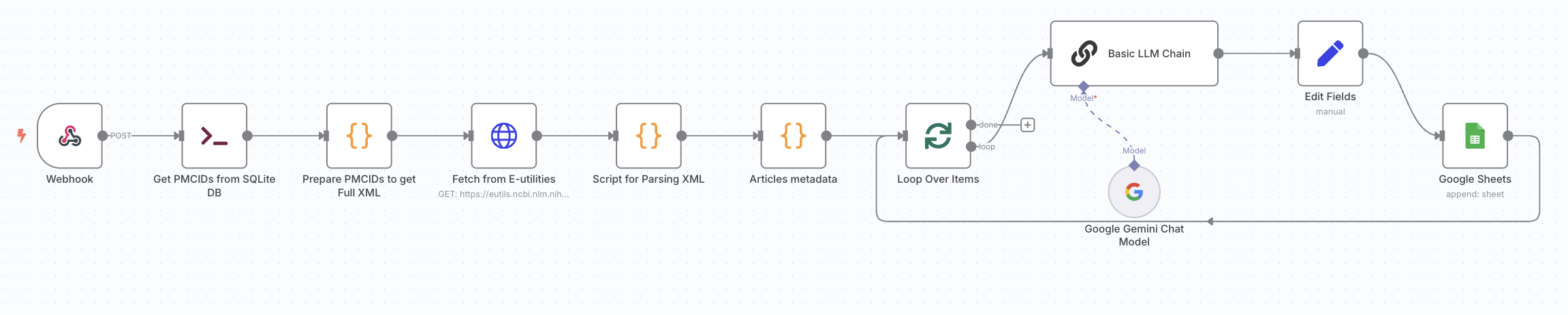
The first workflow automates the summarization of 50 recent articles citing Enrichr. It begins by executing a command that queries a local SQLite database to retrieve the most recent PMCIDs of articles. These IDs are passed to the NCBI E-utilities API to fetch the full XML metadata for each article. A Python script then parses key sections such as title, abstract, body and methods. The parsed metadata is passed to a Google Gemini (PaLM) model via LLM node, prompting it to generate deep-dive style explanations particularly on how Enrichr was used in each article. At the end of the workflow, the summaries, along with article ids and citations, are appended into a Google Sheet, for further processing in the next stage of article generation.
A.2 Obtaining a Detailed Article
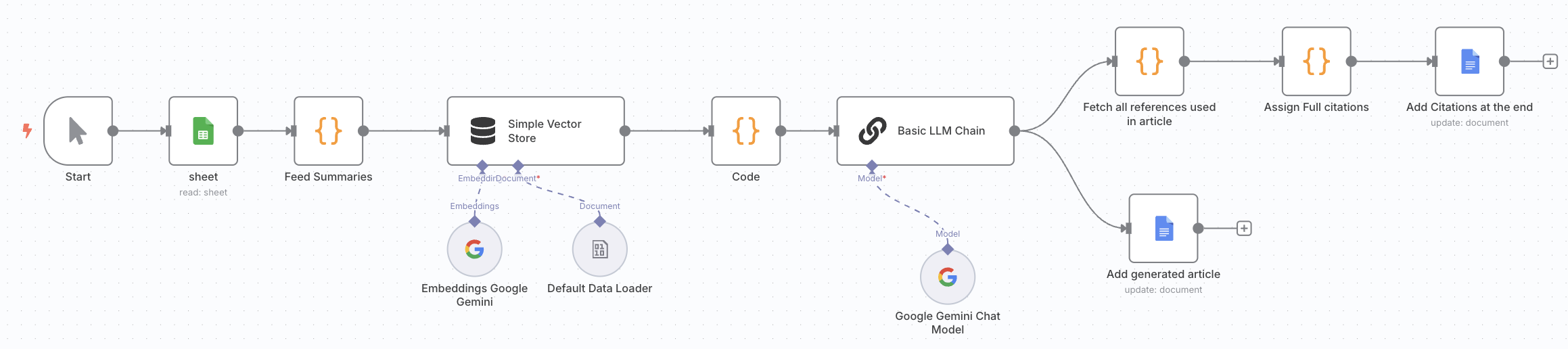
This workflow uses the individual article summaries to produce a single article containing all the details of how Enrichr was used in recent studies. It begins by extracting all summaries from the Google Sheet from the previous workflow. These summaries are then embedded using Google Gemini's embedding model and stored in an in-memory vector store. The chunks are combined and passed to a Google Gemini (PaLM) model using the LLM node, along with a detailed prompt to write a full length article describing how Enrichr was used across all studies. The model then generates an article with structured sections (abstract, introduction, methods) and uses inline citation numbers without listing full references. A separate parsing step is added to detect the references used in the text, retrieving the corresponding full citation entries, and adding them to the generated document. Finally, we store this generated article in a Google Document.